Two Authentication Mechanisms
There are two mechanisms for authenticating to Handcar. One uses MIT’s Touchstone to perform the authentication the other uses AGENT KEYS. Each has it’s own URL.
- The Touchstone one is https://mc3-demo.mit.edu/handcar-authn/services/learning/
- Note the “handar-authn” in the above url. This url has been configured to require the user to log in via Touchstone.
- The Agent Key one is https://mc3-demo.mit.edu/handcar/services/learning/
- This url has been configured to allow any users to connect to the service as a GUEST “MC3GUE$T”.
- Handcar then uses “agent keys” or tokens to identify users and grant access to it’s resources. If you do not have any keys then you can enter only as a guest. (see below).
Which authentication mechanism should I use?
It depends on how you are going to build and deploy your application.
Authentication Use Cases
These use cases describe the different scenarios that we expect to encounter. We distinguish between whether the the HTTP request comes from the same server that hosts the Handcar service, or a server remote from the Handcar host server.
` <#>`__` <#>`__
Different server than handcar
Same server as Handcar
Only Server calls handcar
Scenario 1
Scenario 3
Browser client makes AJAX calls directly to handcar
Scenario 2
Scenario 4
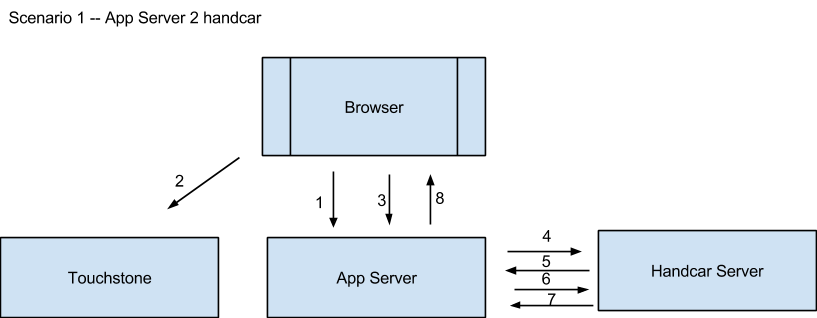
Scenario 1 – The Application Server talks directly to handcar
Scenario one describes an application server that manages MC3 data directly on behalf of a user
- User tries to access app
- Gets routed to touchstone to get authenticated
- Gets redirected back to the app
- App uses it’s own application key to request from handcar a short lived agent key for the user
- Handcar creates the key for the actual user and returns it to the app
- App asks for the needed resources specifying that short lived agent key
- Handcar sends back results
- App sends results back to browser to display on the screen
Scenario 2 – Application Server constructs key for user, sends to Browser so it can talk to Handcar
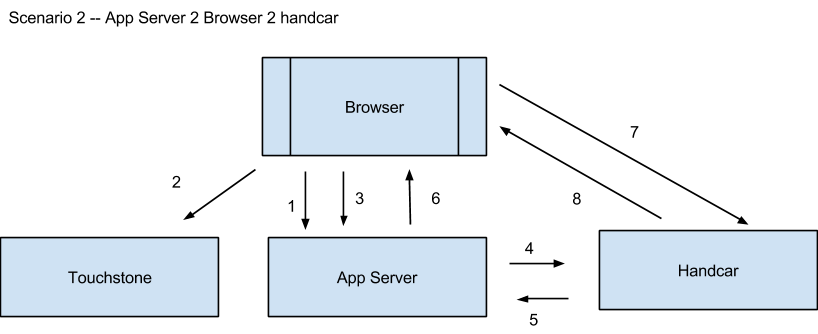
- User tries to access app
- Gets routed to touchstone to get authenticated
- Gets redirected back to the app
- App requests from handcar a short lived agent key for the user
- Handcar creates the key for the actual user and returns it to the app
- The app sends that key to the browser
- Browser code uses that key to call handcar
- Handcar replies back to the browser with request
Scenario 3 – Application is running on same server as Handcar and talks to handcar server to server
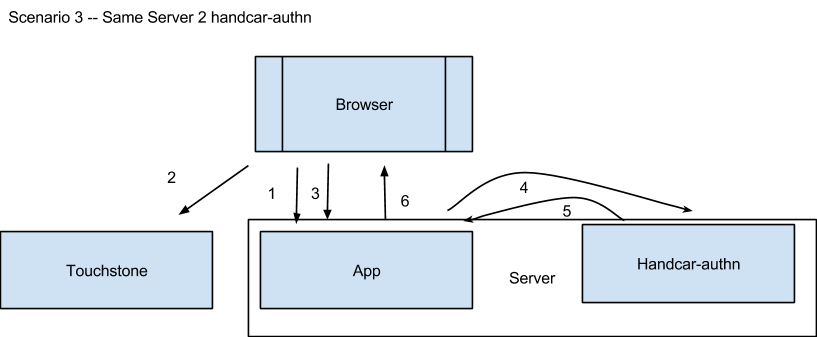
- User tries to access app
- Gets routed to touchstone to get authenticated
- Gets redirected back to the app after getting authenticated
- App on server requests makes request of handcar-authn using the user’s authentication
- This happens automatically because the app and handcar-authn are both on the same server and share the session
- TODO: verify that this actually works!
- Handcar-authn returns the request back to the app
- App sends the data to the browser
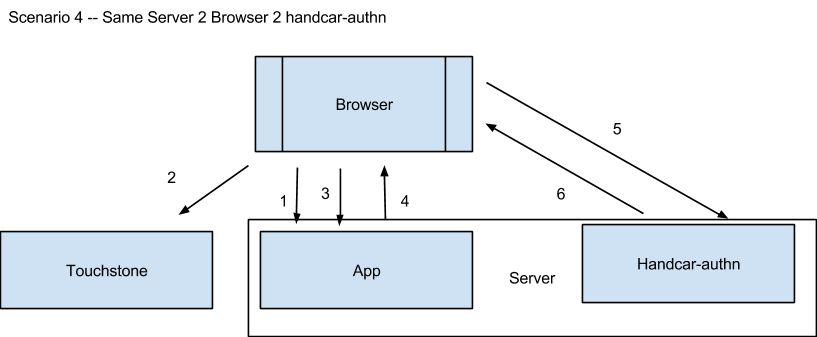
Scenario 4 – application is running on same server as handcar and browser uses touchstone cookies to talk to handcar
- User tries to access app
- Gets routed to touchstone to get authenticated
- Gets redirected back to the app after getting authenticated
- App sends java script code to browser
- Code in browser calls handar-authn using the touchstone cookies and not using the agent key
- User is already authenticated because they are on the same same server!
- handcar-authn sends the data to the browser
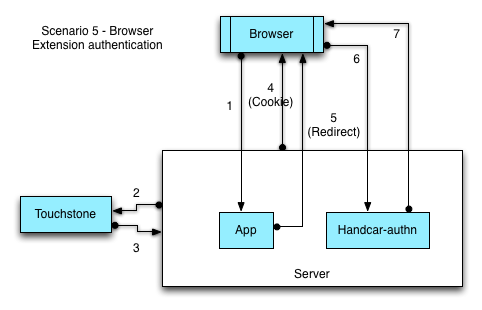
Scenario 5 – application is a browser extension and has access to cross-domain cookies
For FireFox and Chrome browsers, extensions have access to cross-domain cookies. This allows them to authenticate the user against a Touchstone-enabled server (i.e. running handcar-authn), and then have authenticated communications with an MC3 service. The MC3 Browser Extension is one example of this.
- Using the extension, user logs into the MC3 service. Browser extension sends an HTTP request to a redirect service running on the same server as the handcar-authn service. A query parameter should be included, which should be the current webpage the user is looking at. For example:
- https://mc3-demo.mit.edu/be_auth/login?redirect_url=www.google.com
- The Apache service running on the server intercepts this HTTP request and redirects the user to a Touchstone login screen. The user must log in with their Touchstone credentials.
- The Touchstone service returns an authenticated user to the server. The username is embedded in the request header in the REMOTE_USER field.
- The Apache service on the server sets a session cookie and a Touchstone cookie on the user’s browser. The domain for this will match the handcar-authn service (i.e. mc3-demo.mit.edu).
- The server-side redirect application also sets a cookie with the username of the user. This provides the browser extension with the username (for personalization).
- The redirect application on the server then redirects the user’s browser window to the original webpage. This is transparent to the user.
- The user can now use the browser extension to talk to handcar-authn, in an authenticated fashion. The browser automatically handles communications with handcar-authn and provides the Touchstone cookie as needed.
- Note that the browser extension itself does not handle the Touchstone cookies. It only reads the cookies in order to tell if a user is logged in or not. Without the ability to read these cookies (like in Safari), the browser extension cannot detect if the user is authenticated against Touchstone and personalize the screen (i.e. change the Log In / Logged Out text).
- Handcar-authn returns requested data to the user / browser extension.
Ok, my app can authenticate to handcar but how can I get Touchstone to authenticate users to my app?
If your application will run on the same server as handcar you don’t have to do anything. We will configure your application to work with touchstone. If your application will run on a different server then it is a more complicated process. You need to work with MIT’s touchstone people and the process involves creating and exchanging certificates.
Authenticating to Handcar via Touchstone
The url is https://mc3-demo.mit.edu/handcar-authn/services/learning/
Note the “handar-authn” in the above url. This url has been configured to required the user to log in via Touchstone.
When you access handcar via this URL it redirects you to the Touchstone login site. Once authenticated it includes in your HTTP requests special “cookies” that authenticate you to the handcar service.
Can non-MIT users use my application?
They can access it as a guest, MC3GUE$T, but are limited to those authorizations, (see below). Currently only users with full MIT credentials (Kerberos ids) can access MC3 fully. This is a limitation of the MIT Roles database which only accepts fully credentialed users.
What about Touchstone Collaboration accounts and InCommon accounts?
No. Since these are not fully credentialed they cannot be granted any authorizations in the roles database so they cannot access the system as anything but as a guest.
Authenticating to Handcar using Agent Keys
When you go to the learning service via this URL https://mc3-demo.mit.edu/handcar/services/learning/ it has configured to allow in any users to connect to the service as a GUEST “MC3GUE$T”. Handcar then uses “agent keys” or tokens to identify users and grant access to it’s resources. If you do not have any keys then you can enter only as a guest. (see below). Each agent key encodes and encrypts two things:
- an agent Id – typically an email address like nwright@mit.edu
- an expiration date – A date/time stamp when the token will expire and can no longer be used to access handcar
What do these keys look like?
They are all prefixed by “AGENT_KEY” followed by a long string of gibberish, for example:
AGENT_KEYS6joWZkxqzi5H3Mu3ULGfviSF92D7BO2oRkaFo0VL1LXTQ6X2qbHgX6VQ4wEn%2BIX
This is the key hrm%40.mit.edu that expired about an hour before I wrote this so using this key SHOULD NOT work.
The token is created based on a secret encryption key that varies by which server you are using. Therefore you might need three different keys:
- One for our development tier: OKI-DEV
- One for our user testing tier: MC3-DEMO
- One for our production tier: MC3
Expiration Date
By default an agent key will expire 1 hour after it is issued. After that you will have to get a new one.
TODO: Change handcar to automatically extend the expiration date to 15 minutes after last access.
When the key is generated you can optionally request it a longer duration.
==> Warning: the keys are not saved permanently to disk so they will get trashed if we have to recycle the server and become unusable even if the expiration date has not passed.
Can anyone construct these keys?
No only a handful of authorized people and applications can construct these keys..
Applications can have keys too?
Yes applications themselves can have their own key and can be configured to construct a key on behalf of a user. That is why it is called an “agent key” and not just a “user key”. Applications are often authorized agents that can access the system to construct keys on behalf of a real user who has logged into their application.
The sequence goes something like this:
- End user logs into the application using some form of authentication (preferably MIT’s touchstone)
- Application uses it’s own key to ask handcar to construct a new key just for the logged in user
- handcar/services/authentication/agentkeys/{agentId}?duration={SSSS}?proxyname={application key}
- See Handcar contractdoc construct key for agent
- The application then uses that new key on behalf of the user to make calls to handcar
- handcar/services/learning/XXXXXXXXXXX?proxyname={new key for user}
I’m writing an application, can I get an app key?
If the application is going to run on the same physical server as Handcar you don’t need one. Touchstone authentication reaches across the application boundaries.
If you do need an application key please contact handcar-help@mailman.mit.edu
“Quasi” Permanent Keys
We can also configure permanent keys with a fixed expiration date at some point in the future, for example new years eve, 2013-12-31. This is done on a case by case basis. In general only applications get these quasi permanent keys but some power users have them as well.
==> Since this key needs to be kept SECRET it is dangerous to have it last so long.
Note: These keys DO survive reboots of the server because they are persisted each time from a hidden set of properties files.
Using Proxy Name to make an authenticated request
If you want to make an authenticated request you put the agent key into the optional “proxyname” query parameter
?proxyname=AGENT_KEYS6joWZkxqzi5H3Mu3ULGfviSF92D7BO2oRkaFo0VL1LXTQ6X2qbHgX6VQ4wEn%2BIX
Example #1 Construct an Agent for a user
https://mc3-demo.mit.edu/handcar/services/authentication/agentkeys/nwright
TODO: construct a curl example
Example #2 Check if an Agent Key is (still) valid
TODO: construct a curl example